What's New in HorseBook: The Fall Catch-Up (1.1.12 through 1.1.17)
Six HorseBook updates since August: the Broodmare Board, medications with withdrawal tracking, vital signs, one-sentence Quick Entry, foaling windows that follow the record, and read-only access when a plan lapses. What landed and where it lives on iPhone and web.
By Brian Bickell, who raises paint and quarter horses at Bickell Ranches in Stillwater, Oklahoma.
The last roundup covered through 1.1.11 at the start of August. Six updates have gone out since, 1.1.12 through 1.1.17, and the web dashboard has shipped alongside every one of them. Most of what is in them came from the same place the rest of HorseBook does: a message from somebody running horses, describing the thing they still had to keep on a whiteboard. This is the tour.
The headline: the Broodmare Board
A breeding operation with more than a handful of mares has always had a board somewhere. Dry-erase in the barn office, a legal pad in the truck, a spreadsheet nobody but one person can read. Every mare on a row, and for each one: is she in foal, who to, when was she covered, when is the last check, and when does foal watch start. HorseBook kept all of that on each mare's own page, which is the right place for the record and the wrong place for the question "where does the band stand this morning."
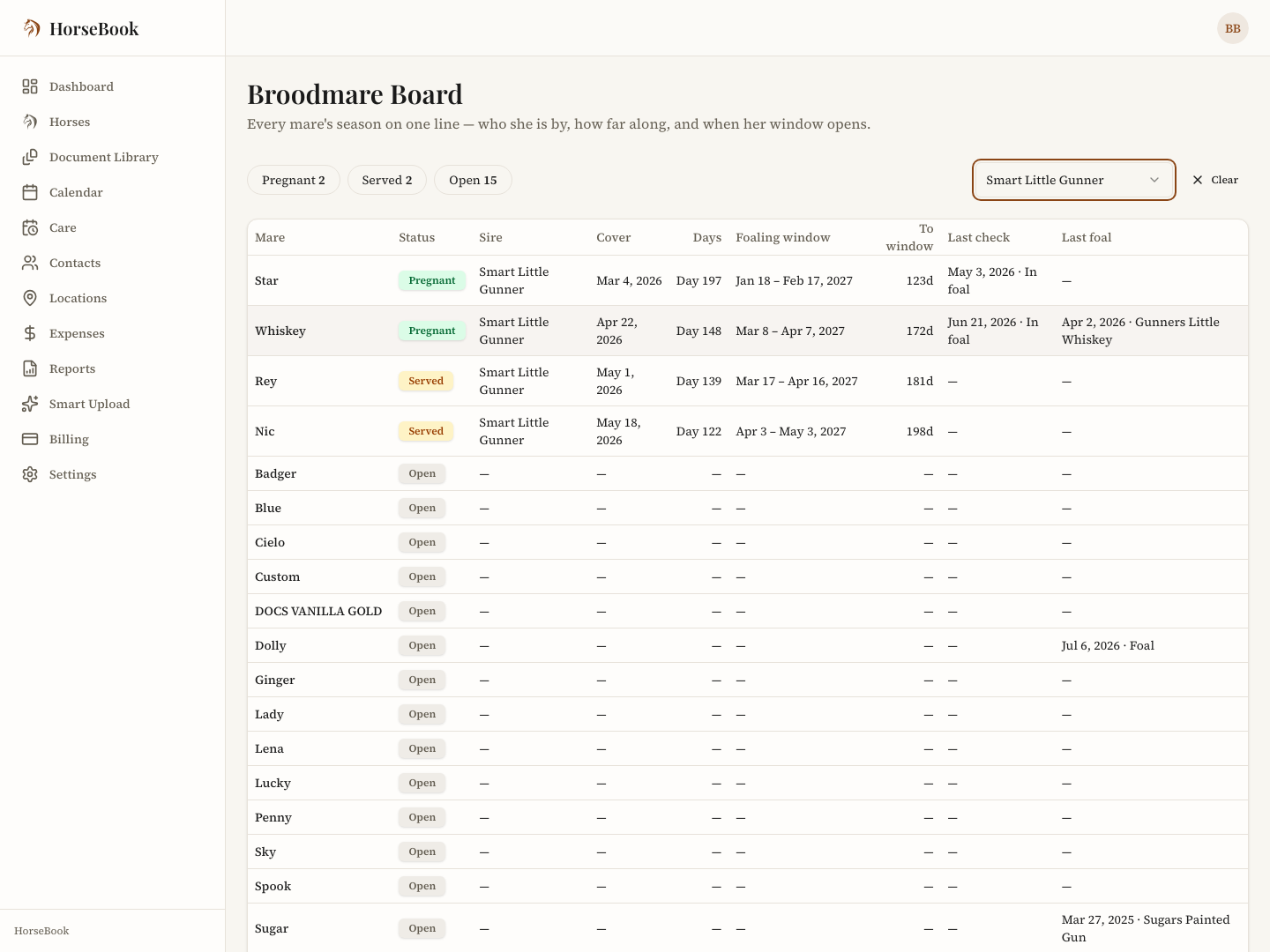
The Broodmare Board answers that question on one screen. Every mare in the account is a row, with one of three statuses:
- Pregnant — a confirmed pregnancy on record.
- Served — covered this season, and the pregnancy is not confirmed yet.
- Open — no current pregnancy.
The three statuses sit across the top as counts. Tap one and the board narrows to that group. A stallion filter narrows it further, so the mares booked to one horse can be read as a group and the rest fall away.
Each row carries the stallion, the cover date, days since cover, the foaling window as a date range, how far off that window is, the last pregnancy check with its result, and the last foal. The "to window" column reads in days before the window opens, then "in window," then "overdue" with a day count once the window has closed without a foaling recorded. Tapping a row opens the mare's own Breeding page, where the full record lives.
Where it is:
- On the web, open any mare's Breeding page and use the Broodmare Board button in the header.
- On the iPhone, open the Farm tab and tap Breeding. A grid button on any mare's Breeding page opens the same board.
The board reads from the records already in the account. There is nothing to fill in to make it work; a mare with a cover and a positive check is Pregnant, a mare with a cover and no check yet is Served, and the rest are Open.
Say what you did
Quick Entry landed in 1.1.14 and got its own writeup, so the short version: type or dictate one sentence, "dewormed Libby, Codie, Annie and Daisy this morning," and HorseBook turns it into a separate record on each horse named. A confirm screen shows every record before anything saves. On the iPhone it is under the Add tab as Say What You Did; on the web it is the Quick entry card on the dashboard. The full walkthrough is in Say What You Did: One Sentence Becomes the Records.
Medications, with the withdrawal date worked out
1.1.13 added a Medications card to every horse. A medication record holds the name, the route, the dose and unit, the frequency, start and end dates (or ongoing), who prescribed it, the reason, where on the horse it goes, and notes. The field that matters for a show string is Withdrawal, entered as a number of days from the label or from the vet.
HorseBook counts the withdrawal from the end of the course and shows an In withdrawal until badge on the horse with the clear date, so the question "can he go this weekend" gets answered by the record instead of by memory. While a course is still open with no end date, the badge says the clear date will be set when the course ends. HorseBook does not supply withdrawal periods; it does the arithmetic on the one entered.
Vital signs, as a record
The same release added a Vitals card. A vitals entry takes temperature, heart rate, respiration, gum color and moisture, capillary refill, gut sounds by quadrant, digital pulse by limb, skin tent, and notes. The point is the baseline: a horse's normal, written down on a good day, is what makes the bad-day numbers mean something when the vet asks. Quick Entry writes vitals too: a temperature said in the same sentence as "off her feed" becomes a vitals record and an illness note on that horse in one go.
Foaling windows that follow the record
Three fixes across the summer changed how the foaling window on a mare's page behaves, and they are worth knowing about because the window is what foal watch runs on.
- A negative check moves the anchor. When a pregnancy check comes back negative and the mare is covered again, the window now counts from the cover after that negative check, not from the first cover of the season. If the negative check stands, with no later cover and no later positive, the mare has no window at all rather than a stale one.
- Deleting a cover recalculates. Removing a breeding record now re-runs the pregnancy status the same way removing a check does, so the status card and the board never disagree with the covers that remain.
- An open foaling follows its anchor. On the web as of this week, a foaling record that has not yet been given a foal date keeps its window tied to the cover and check that produced it, instead of freezing the dates it was created with. The iPhone app carries it from 1.1.19.
The window is still shown as a range, never a single date, and the Gestation History card on each mare keeps the earliest, average, and latest she has actually carried once she has a foaling on record.
When a plan lapses, the records stay readable
Since 1.1.14, an account whose trial or subscription has ended does not hit a wall. A ribbon reads "Read-only — your records are safe. Reopen to add." Every record, every document, and every report stays readable, and exports keep working. What needs a plan is adding or changing anything, including the scanner, since a scan is a write and costs money to run. Nothing is deleted, and choosing a plan later reopens the account exactly as it was left. That felt like the honest way to handle somebody's records, and it replaced the old restore-offer flow entirely.
For stallion owners: contracts on the booking
On the Breeder plan, a booking now carries a Breeding Contracts section. A contract can be generated from a per-stallion season template (kept on the web under Settings → Contracts), edited, marked sent, and voided. On the web, the My contract option takes an operation's own contract document and fills it from the booking instead of starting from HorseBook's template. Sending a contract link for a mare owner to accept online is built but not switched on yet; for now the contract goes out the way it always has, and HorseBook keeps the record of it. The full stallion book is described in the Breeder plan post.
The everyday stuff
- A shorter start. New accounts answer four questions and land on a dashboard with a setup checklist that ticks off as horses and records go in. The checklist can be dismissed.
- Document uploads now offer rental agreement, training contract, and breeding contract as document types, so those papers file under what they are.
- Records imported from another program with a missing breeding method no longer break the Reproduction tab on the iPhone. That one bit a customer moving a large herd over from another program, and 1.1.17 carries the fix.
- On the Breeder plan, a charge that has been paid keeps its booked amount when the booking is edited on the web, and every screen that shows paid or outstanding now reads from the same payment records.
Just behind this one
1.1.18 and 1.1.19 have both shipped since this post was drafted, and 1.1.20 is in App Store review as it goes out. 1.1.18 carries four new contact roles, Breeder, Buyer, Mare Owner, and Stallion Owner, which are already live on the web, plus clearer error messages when a horse page fails to load. 1.1.19 and 1.1.20 tighten the foaling window further: each cover's own record follows the pregnancy's anchor, and the window counts from the last cover of the cycle rather than the first, which is how breeders and vets already reckon it. Nothing in them needs a plan change.
Thanks, as always
The Broodmare Board exists because a breeder moving a large operation over sent four exports and asked why the app could not show what her whiteboard showed. The reply address on every email from the app reaches the person who writes the code, and a surprising share of what arrives there ships.
The Broodmare Board, medications with withdrawal dates, and one-sentence Quick Entry are on every plan and in the free trial, on iPhone and web.
Free to download · 14-day free trial
Frequently asked questions
Does HorseBook show which mares are in foal?
Yes. The Broodmare Board, added in September 2026, lists every mare in the account with a status of Pregnant, Served, or Open, the stallion, the cover date, days since cover, the foaling window, and the last pregnancy check, and it filters by stallion. It is on the web dashboard and in the iPhone app from version 1.1.17.
Does HorseBook track medication withdrawal times?
A medication record takes the name, route, dose, frequency, start and end dates, who prescribed it, and a withdrawal period in days. HorseBook works out the clear date from the end of the course and shows an In withdrawal badge on the horse until that date passes. The withdrawal period itself comes from the label or the vet; HorseBook does not supply it.
What happens to records when a HorseBook trial ends?
The account goes read-only. Every record stays readable and exports still work; adding or editing anything needs a plan. Nothing is deleted, and picking a plan later reopens the account as it was.
Is the Broodmare Board on the iPhone app?
Yes, from version 1.1.17. It is on the Farm tab under Breeding, and a grid button on any mare's Breeding page opens it too. On the web it opens from the Broodmare Board button on a mare's Breeding page.