Broodmare Management App: Every Mare in the Band on One Board (2026)
What a broodmare board has to answer at 10, 30, or 80 mares, and how the HorseBook Broodmare Board answers it: Pregnant, Served, or Open for every mare, the stallion, days since cover, the foaling window, and the last check, filtered by sire, on iPhone and web.
By Brian Bickell, who raises paint and quarter horses at Bickell Ranches in Stillwater, Oklahoma.
Every breeding operation past a handful of mares runs on a board. On most places it is a dry-erase board in the barn office: mares down the left edge, and the stallion, the cover date, and a checkmark for "confirmed" across each row. A breeder who moved a large operation into HorseBook this summer sent four spreadsheets that were the same board at ten times the size. The board is the one artifact every program keeps in some form, because the question it answers is the one the manager asks every morning of the season: where does the band stand today.
The individual mare's record does not answer that question. A mare's page is the right place for her cycles, her covers, her checks, and her foalings, and the wrong place to find out which of thirty mares still needs a recheck this week. The HorseBook Broodmare Board, released in September 2026 on the web dashboard and in iPhone app version 1.1.17, is the answer to the morning question built from the records already on each mare.
What a Broodmare Board Has to Answer
A working board, on a whiteboard or on a screen, carries the same handful of facts per mare:
- Her status for the season. Open, served and waiting on a check, or confirmed in foal.
- The stallion. Which horse she was covered by, so the mares booked to one stallion can be read as a group.
- The cover date, and how long ago it was. The count that decides when the first check is due and when foal watch starts.
- The foaling window. A range of dates, never a single day, because no foal reads a calendar.
- The last check and its result. The most recent thing the vet said about her.
Anything that does not answer one of those questions clutters the board. Anything that leaves one unanswered sends the manager back to the individual records.
How the HorseBook Board Works
The Broodmare Board lists every mare in the account, one row each, with one of three statuses:
- Pregnant — a pregnancy check on record came back positive and nothing since has reversed it.
- Served — she has a cover this season and the pregnancy is not yet confirmed.
- Open — no current pregnancy.
The three statuses sit across the top as counts. Tapping one narrows the board to that group. A stallion filter narrows it further; a Clear control puts the whole band back.
Each row carries the stallion, the cover date, days since cover, the foaling window as a date range, how far off the window is, the last pregnancy check with its result, and the last foal. The distance-to-window reads in days until the window opens, then "in window," then "overdue" with a day count once the window has closed without a foaling recorded. Tapping a row opens the mare's own Breeding page, where the full timeline lives.
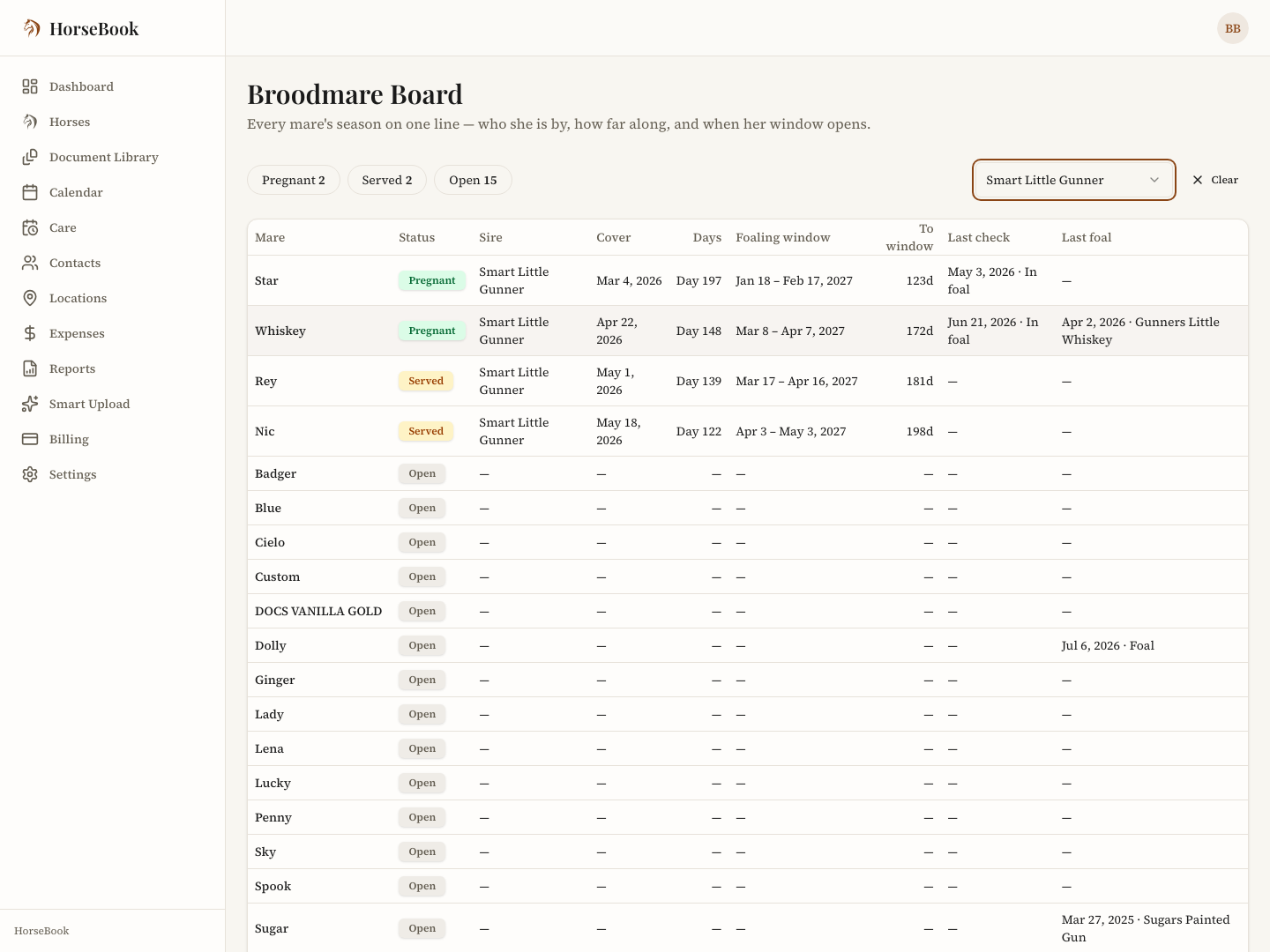
There is nothing to fill in to make the board work. It reads the covers, checks, and foalings already recorded on each mare. A mare with a cover and a positive check is Pregnant; a mare with a cover and no check yet is Served; a mare with neither is Open. Recording the next check on her page changes her row on the board the same moment.
The Record Behind Each Row
A board is only as trustworthy as the arithmetic under it, and three rules in HorseBook decide what each row says.
A negative check moves the anchor. If a mare's check comes back negative and she is covered again, her foaling window counts from the first cover after that negative check, not from the first cover of the season. If the negative check stands, with no later cover and no later positive, she has no window at all rather than a stale one, and she reads as Open.
Deleting a cover recalculates the status. Removing a breeding record re-runs the mare's pregnancy status the same way removing a check does. The board never shows a status that the remaining covers cannot support.
Each mare carries her own gestation history. Once a mare has a foaling on record, her Breeding page adds a Gestation History card: the earliest, average, and latest she has actually carried, one row per foaling. After a season or two, foal watch can run on what this mare does rather than the textbook figure. The board's window still comes from the cover date; the history card is the context for reading it.
Where the Board Lives
- iPhone. Open the Farm tab and tap Breeding. A grid button in the header of any mare's Breeding page opens the same board.
- Web. Open any mare's Breeding page and use the Broodmare Board button in the header.
The board is on every plan, including the trial. Mare-side breeding records have always been on every HorseBook plan; the stallion side (bookings, collections, shipments, fee schedules) is the Breeder plan.
The Season, Read Off the Board
The board reads differently by the month. In spring, the Served group is the check list and the Pregnant group with "in window" against it is the foal-watch list. By late summer, the Open group is the list of mares to decide about: rebreed, carry over, or sell. In the fall, when the season's foals are on the ground and the covers have stopped, the board is the planning document for next year, one row per mare with the stallion she went to and how she carried. The same screen, three different jobs, and none of them requires opening a single mare's record.
For the record-keeping that feeds the board, tracking a mare's breeding season walks the cycle-to-foaling timeline on one mare, and foaling records and mare tracking covers what to write down at the foaling itself. The horse gestation calculator gives the window for a single cover date without an account.
Every mare's status, stallion, cover date, and foaling window on one board, built from the records already on each mare. On every plan, iPhone and web.
Free to download · 14-day free trial
Frequently asked questions
What is a broodmare board?
A broodmare board is the one-page view of a breeding operation: every mare on a row with her status for the season (open, served, or in foal), the stallion, the cover date, and when foal watch starts. Traditionally it is a whiteboard in the barn office or a spreadsheet; in HorseBook it is a live screen built from the breeding records already on each mare.
What does the HorseBook Broodmare Board show for each mare?
Her status (Pregnant, Served, or Open), the stallion, the cover date, days since cover, the foaling window as a date range, how far off that window is, the last pregnancy check with its result, and the last foal. Tapping a row opens her full Breeding page.
Can the board be filtered by stallion?
Yes. A stallion filter narrows the board to the mares covered by one horse, and the three status counts across the top act as filters too, so the Open mares or the Served mares can be read as a group.
Is a broodmare management app worth it for a small band?
The board helps most once there are more mares than a person can hold in their head. Below that, the same records on each mare do the job. HorseBook's board is on every plan, so a three-mare operation and a thirty-mare one see the same screen.
Does the board work on iPhone and web?
Both. On the iPhone app (version 1.1.17 and later) it is on the Farm tab under Breeding. On the web dashboard it opens from the Broodmare Board button on any mare's Breeding page. The two stay in sync because they read the same records.