Book a mare to your stallion
Set up a stallion's season, take bookings and booking requests, track the deposit and stud fee, ship to the mare and book a breed-back.
To book a mare to your stallion in HorseBook, start his season under Farm › Stallions with its stud fee, booking fee and guarantee, then add her with New booking, or send the mare owner the season's Contract link so they book and sign it themselves. Each booking keeps its contract, deposit, balance, shipment and result together, and Bookings lists every mare across every stallion with what each one owes and what to do next. It works the same on the web and in the iPhone and iPad app, on the Business plan.
Start his season
A season is one stallion's booking year: the prices and terms every new booking starts from.
- Open Farm › Stallions and pick the stallion.
- Choose Start a season. Set the year, the hemisphere, the Default stud fee, the Default booking fee (the deposit), any Collection fee and Shipping fee, an optional Early-booking price with the day it ends, and the default guarantee.
- Later, Season setup on his page changes the prices (Edit prices), picks the season's Default contract (Change) and edits his Built-in terms.
- Open the Farm tab, then Stallions, then the stallion.
- Tap + and choose Start a Season. The fields are the same as on the web: year, hemisphere, stud fee, booking fee, guarantee, collection and shipping fees, and an early-booking price with its end date.
- Season setup on his page opens Seasons and prices (each season's Prices) and Built-in terms. It shows the season's default contract; changing which contract that is happens on the web.
A new booking made on or before the early price's last day starts at the early price, and after it at the regular fee. Either way it's a starting point you can change on the booking. Changing a season's prices doesn't change bookings already made.
Add a booking
New booking is on the stallion's page, at the top of Bookings, and in + Add (the Add tab on iPhone and iPad). If you stand more than one stallion it asks which one first.
The form takes the mare (one of your horses, or Outside mare and her name), the client who owns her, the season, the date, how she will be bred (live cover, fresh, cooled or frozen AI, embryo transfer and the rest), the status, the Fee and the Deposit, whether the deposit has been paid, and whether it counts toward the fee. The fee and deposit fill in from the season. The Shipment section can wait until she ships.
Booking requests from your Contract link
Contract link, at the top of his page, is one link for the whole season. Send it to mare owners, or put it on your website. They fill in their details, read your contract with those details filled in, and sign on their phone. Each signature becomes a pending booking with their contact, the season's charges and the signed contract. The link turns itself off when the season closes and takes at most 25 signatures a day. For the contract itself, see Send a contract to sign.
A booking that came in this way is a booking request until you answer it. It shows first among the bookings in Needs you (under the care items) as New signed contract, with Accept and Decline on the line while three or fewer are waiting, and the same two buttons are on the booking itself, on its Booking request card.
- Accept keeps the booking. It becomes an ordinary booking and leaves Needs you.
- Decline asks first, then cancels the booking, voids its open charges and the contract the mare owner signed. You can add a note for your records. They are not emailed, so tell them yourself.
The Bookings list
Bookings (Farm › Bookings, on both clients) is every mare on the book, across every stallion. Search by mare, owner or stallion, and filter by:
- Season (or Not in a season), Stallion, Status and Owner.
- Contract: needs a contract, unsigned over a week, offer expired, or signed. A contract signed on paper and uploaded counts as signed.
- Money: Deposit unpaid, Balance due or Paid up.
- Stage: To ship (semen owed and not gone out) or In foal (reported).
Sort orders the list by date booked, mare name, status or what is owed. On the web the address keeps your filters, so you can bookmark "who owes me a balance".
Each row has one button for the next thing to do: Send contract, then Copy sign link on the web or Share sign link on iPhone and iPad (Create link if the contract went out without one), Extend offer if the owner didn't sign in time, Share invoice once it's signed and money is owed, and Record payment after that. A booking that's signed and paid up has no button. The sign link copies (or shares) straight from the row; the other buttons open the booking at the card that does the job. If you emailed the owner a link they still need, Remind sends it again, once a day at most.
The booking page
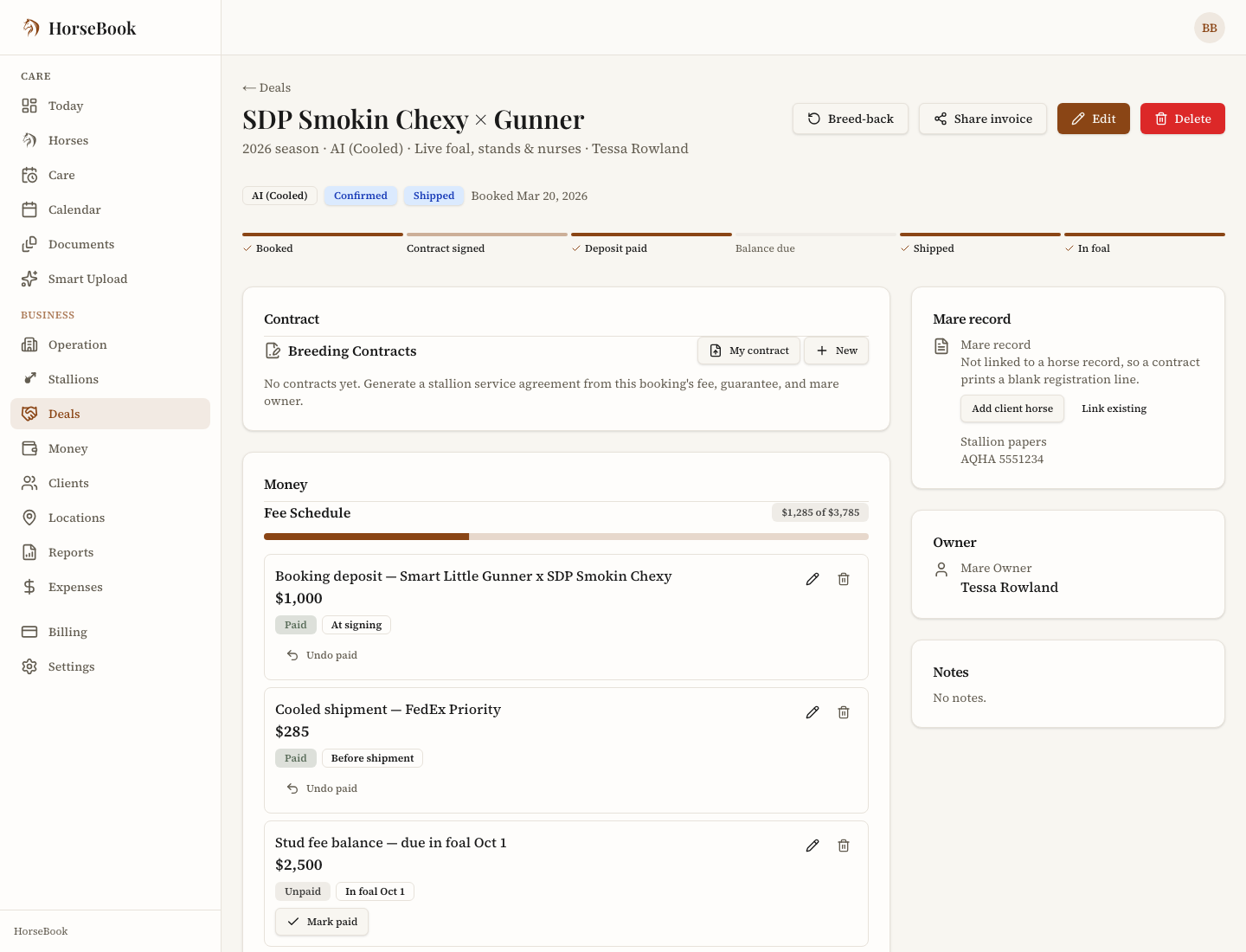
Open a booking and its stages run across the top: Booked, Contract signed, Deposit paid, Balance due, Shipped (Covered for a live cover) and In foal. A "Next:" line names the step that's waiting. The page holds the contract, the fee schedule, documents, the shipment, the mare's record, her owner's details, notes and the mare's result.
It has its own web address, so you can keep it open in a tab or send yourself the link. Her owner's name opens their client record.
The contract and the papers
The booking's Contracts card holds its contract in one place: the ones HorseBook generates, and a signed copy you already have (a PDF or a photo), added with Upload signed copy. Health certificates, shipping papers and the rest go on the Documents card, so the paperwork lives with the mare it covers. If the mare is in your HorseBook too, what you upload shows under her documents as well. Viewing and downloading work on every plan; adding and removing need Business. To send a contract for the owner to read and sign on their phone, see Send a contract to sign.
- Offer good until. When you sign and send a contract you can give it a last day to sign. It's optional. After that day the owner can't sign until you Extend it to a later day; the agreement itself doesn't change. To change the price, Replace makes a new contract for the booking.
- The early-booking price. When the booking's fee is the season's early price, Sign & send fills in "Offer good until" with the day the early price ends. You can clear it or change it.
- Emailing the link. Once a contract's sign link exists, or you've shared the invoice, Email it to the owner sends them the link. It comes from your name "via HorseBook", and their replies go to your email address. Remind sends it again to the same address, once a day at most. If the address can't take email, HorseBook says so and sends nothing: check the address, or copy the link and send it yourself.
The deposit and the stud fee
The Fee Schedule card splits what the booking owes into parts. Set up deposit + balance makes the usual two, with their due points set: the deposit at signing, and the balance when the fee terms say, or before shipment if they don't say. Add other parts with Add a part (Add part on iPhone and iPad), and change any due point there.
Mark paid on a part, or Record payment on the card, opens Record payment for the booking's client with its unpaid parts already picked. A payment smaller than what's owed leaves the last part part paid. Share invoice sends the owner a link to what they owe. For their whole account, board included, see Bill owners each month.
Shipments
Record a shipment on the booking itself: edit it, set Shipment Status (Status in the Shipment section on iPhone and iPad) to Shipped, and fill in the ship date, carrier and airway bill number. The Shipped stage lights up, and the booking leaves the To ship count on his season card. There's no separate shipments list; To ship in Bookings' Stage filter is that list.
If the season has a collection or shipping fee, marking it shipped asks whether to add them to the owner's bill, with the amounts filled in. Not now adds nothing, and the same ship date is never offered twice.
Breed-backs and the guarantee
The Mare result card records how she came out (In foal, Not settled, Live foal or Lost) and the booking's guarantee. When the guarantee says she's owed something, the card says so: a free return owed for next season, or a refund owed under the guarantee. A refund is a note for you; HorseBook doesn't pay it.
Breed-back, on a confirmed or completed booking (in the booking's menu on iPhone and iPad), books the mare again as a new booking, filed in next season by default. The owner, stallion, breeding method and guarantee carry over; the date, deposit, shipping and notes start fresh. It asks which breeding this is a return for, and whether it's a live foal guarantee return: Yes makes the new booking carry no stallion fee, No asks for the fee.
What Needs you shows
On the Business plan, Needs you at the top of Today lists the bookings waiting on you, under the care items, on both clients:
- Booking requests: a contract signed through your Contract link, with Accept and Decline.
- Offers expired: an offer that ran out before the owner signed, with Extend offer.
- Contracts unsigned: a contract out more than a week, or a booking with no contract at all.
- Deposits and balances: a shipment coming up on a booking that still owes its deposit or balance.
- Results to report: a mare bred two weeks ago or more with no result recorded.
Each line opens its booking. When more than three of one kind are waiting, they share one line that opens the full list, with search.
Who can see this, and which plan
Bookings, stallions, seasons and the booking-request link come with the Business plan, and with the free trial. On Hobby and Pro the Stallions and Bookings rows show a lock. A lapsed Business account can still read its bookings.
Bookings carry money, so Staff don't see them: the Bookings list, a stallion's page and the booking lines in Needs you are for you and your Managers. See Your team for what each role sees, and Your plan for the plans.
Common questions
Can a mare owner book my stallion themselves?
Yes. Share your season's Contract link. They fill in their details, read your contract with those details filled in and sign it on their phone, with no app and no account. Each signature arrives as a booking request in Needs you for you to accept or decline.
Where do I set the stud fee and the deposit?
In the stallion's Season setup, under Farm › Stallions. The season's stud fee and booking fee (the deposit) are what every new booking starts from, and you can change either one on a single booking. An early-booking price can run until a day you pick.
Can I book mares from my phone?
Yes. Bookings, New booking, booking requests, the fee schedule, Record payment, shipments and breed-backs all work in the iPhone and iPad app as well as on the web. Changing a season's default contract and the wording of your contracts is done on the web.
Does HorseBook take the stud fee for me?
No. HorseBook records what each booking owes and what you have been paid. The mare owner pays you directly, and you record the payment against their booking.
How do I book a mare back for next year?
Open her booking and choose Breed-back. It makes a new booking for next season with the same owner, stallion, method and guarantee. If it is a live foal guarantee return, answer Yes and the new booking carries no stallion fee.